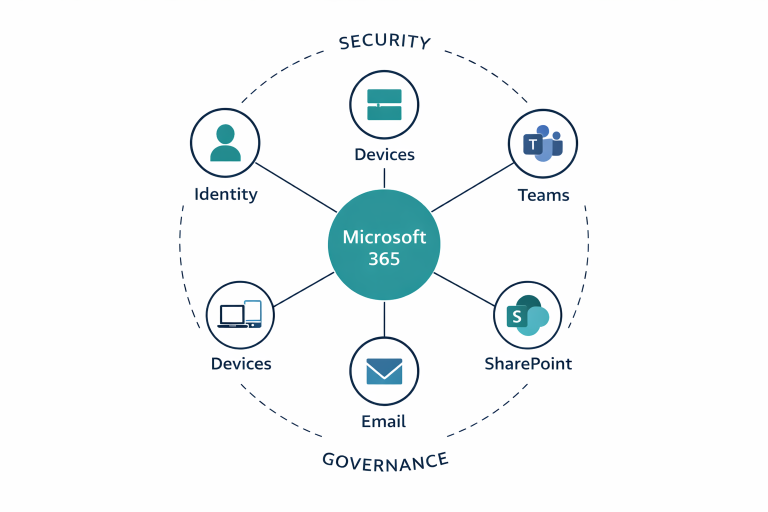

How to Make Microsoft 365 Work as a System, Not a Set of Apps
Many SMEs are either moving into Microsoft 365 without a clear operating model, or already paying for it while each workload still behaves as if it is separate. Email lives in one lane, file sharing in another, Teams somewhere else, and identity controls lag behind them all.
Design around work patterns
The better starting point is not the software menu. It is the operating model: how users collaborate, where documents should live, who owns shared spaces, and how access decisions should be made.
Treat identity as a foundation
MFA, admin-role discipline, guest access, and user lifecycle controls affect every other part of Microsoft 365. Without that baseline, the platform stays fragile.
Connect the workloads
SharePoint, Teams, OneDrive, and Exchange should reinforce each other. When they are configured in isolation, users compensate with workarounds.
Document the operating rules
A good environment should make it clear where personal work belongs, where team content belongs, how sharing works, and when something needs approval.
Stabilise after go-live
The project is not finished when migration ends. Adoption support, documentation, and permission cleanup are what make the environment easier to manage over time.
Read next
SharePoint, Teams, and OneDrive: who owns what?
Use this as the practical companion piece for assigning the right role to each workload.
Seven Microsoft 365 permission problems that create real business risk
Once the operating model is clearer, clean up the access patterns that usually create the next set of problems.
Need Microsoft 365 to feel deliberate again?
A focused project can introduce Microsoft 365 properly from the start, or move an existing tenant from tool sprawl to a governed operating system for the business.